Help · Getting started
Draft a form with AI, change it in words
Describe the form in a sentence; then say what to change.
The ✦ Draft with AI button in the builder's top bar takes a description and drafts the form: the questions, their kinds, which are required, conditions, repeating groups and totals where the description calls for them. The draft lands on the canvas as unsaved changes with an Undo, so nothing is stored until you press Save.
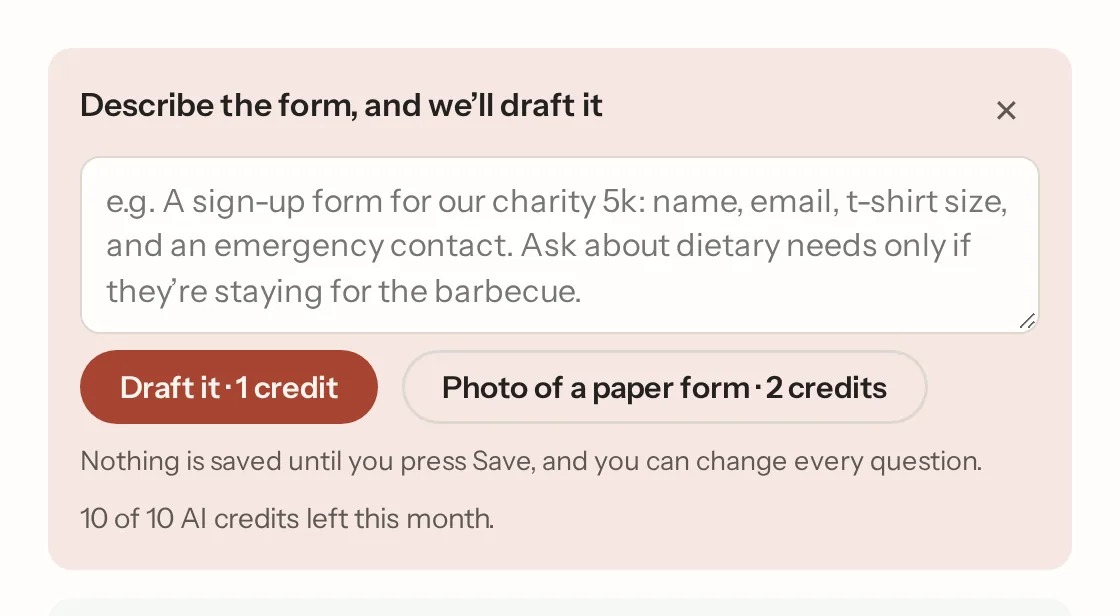
A one-line request usually gets a short form of four to eight questions. If you want more, say so in the description: "ask about dietary needs only if they're staying for the barbecue" gets a condition; "each attendee's name and t-shirt size" gets a repeating group; "small €30, large €50 and a total" gets priced options and a calculation.
Change it in words
On a form that already has questions, the same box reads Tell us what to change. "Add a phone number after the email", "make the date required", "drop the budget question", "move the consent to the end". The questions that stay keep their ids, so a form that already has responses keeps them. Start over drafts afresh from a new description instead. Both have Undo.
The look, in words
The same box changes how the form looks: "make it look like a party", "calmer", "our colours are green and gold", "a serif font", "no pattern", "pill buttons". It sets the same things the Design tab does, and the tab shows what it chose, so you can adjust any part. A description that names an occasion ("Maya's 8th birthday party") gets a fitting look with its draft.
From a photo of a paper form
There's a page of its own on this: turn a paper form into a Papias form.
Photo of a paper form in the same box takes a photo (or up to four, for several pages) from your phone's camera or a file. The questions on the paper become the form: tick boxes become choices, a signature line a signature, "Date of birth" a date, with the paper's wording kept. Anything only paper needs ("office use only", the date beside the signature) is left out. A note in the box goes with the photo ("it's for under-12s"). The draft lands with Undo, like any other, so check it against the paper before you Save. Straight on, in good light, works best. The photo is resized on your device before it goes to the model and is stored nowhere. A photo read is two AI credits (a draft or a change in words is one).
What goes to the model
The form's wording and your request, or the photo of the paper form. Never the answers people have given.
Allowance
AI credits
Free has 10 AI credits a month, Pro 200, Business 1,000. What a credit buys:
| What | Credits |
|---|---|
| Draft a form from a description | 1 |
| Change a form in words, or its look | 1 |
| Read a photo of a paper form, up to four pages | 2 |
The count starts again each month, the AI box shows what's left, and every other way of building keeps working when it's used up. The builder tells you before anything is spent.
You need an account to use AI drafting. A form built without one keeps everything else.
Not what you were looking for? Ask us, and we'll answer and fix the page.