Conversational forms
Conversational forms: let people answer by chatting
Some people would rather answer the way they'd say it. "I'm Sarah, sarah@example.com, signing up my son for the under-12s" fills in three questions at once. With a Papias form set to A conversation, people chat instead of filling in boxes. They see your questions in your own words, tap buttons for the choices, and check a summary of every answer before they send. The ordinary form is always one tap away.
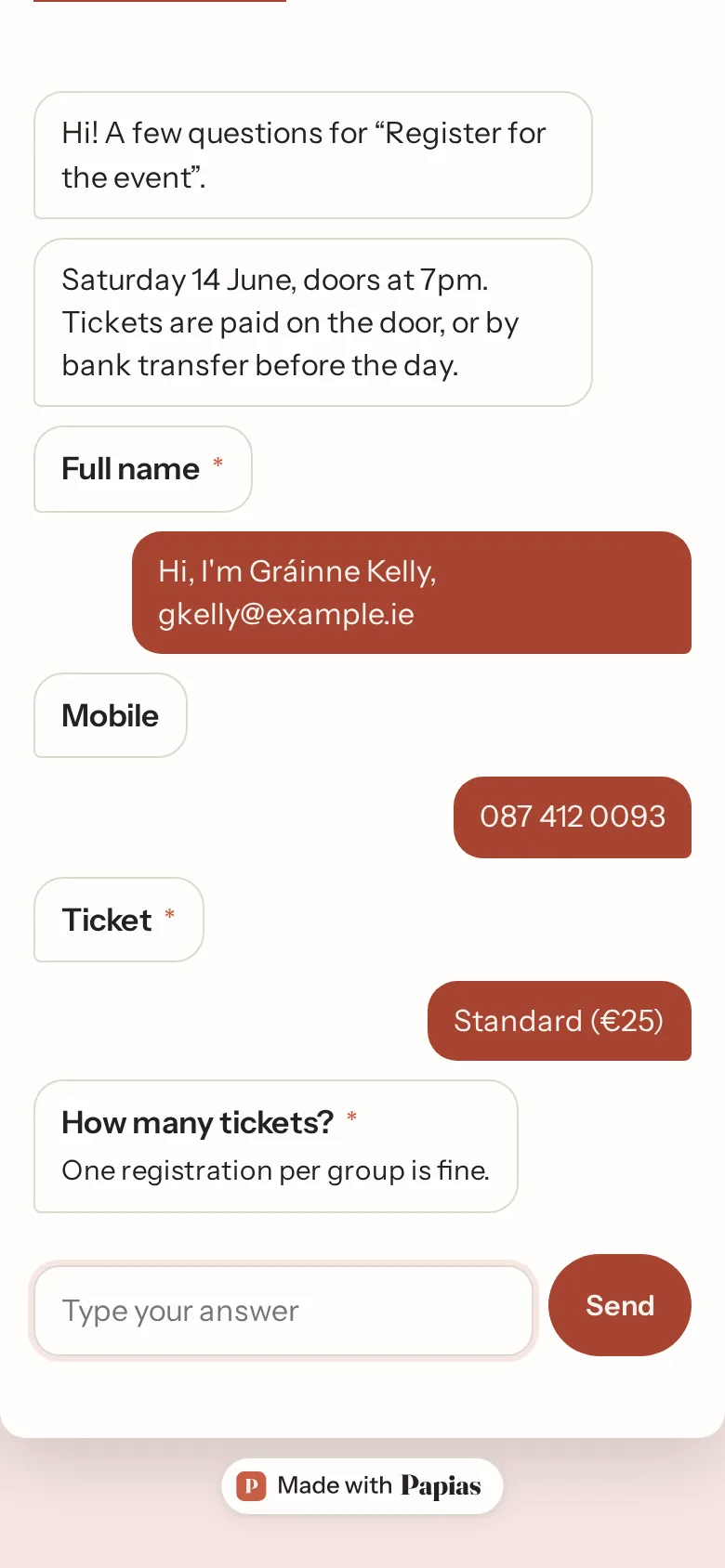
Your questions, your words
The chat asks your questions, as you wrote them, in your order, following your conditions. The AI doesn't write the questions or decide what comes next. Your form does.
Say it once, fill in several
People can answer in a sentence. The AI reads what they type and works out which of your questions it answers: a name and an email in one line, "three of us" as 3. Choices, ratings, scales, NPS, dates and consent are buttons to tap, so nothing is misread.
Every answer checked, and a summary before sending
Every answer goes through the same checks as on the form, so an email that isn't one is asked for again. Before anything is sent, people see all their answers, can change any of them, and press Send my answers. You receive an ordinary response, with the same emails, Sheet row, webhook and payment as from the form.
The form is always there
Use the form instead is at the top of every chat, and the form opens with what they've already said filled in. If the month's conversations run out, or the AI is ever unavailable, the link opens as the ordinary form. Nobody is turned away.
Honest about the AI
The person is told at the top of the chat that an AI reads their messages. What they type goes to Anthropic's Claude, through Yohanun. Nothing is used to train a model, and the chat itself isn't kept, only the answers they send. If someone asks something off the form ("where is it on?"), it answers only from your form's own title, description and help texts, and otherwise says the organiser can tell them.
On every plan
Free has 25 conversations a month, Pro 1,000 and Business 5,000. A conversation counts once it reaches its second question, so someone who opens the link and leaves costs nothing. Typeform sells conversational forms as a separate product (Formless), Jotform as AI Agents.
Start from a template
- Contact formName, email, what it's about, message.
- Event registrationTicket types with prices and a total.
- Customer feedbackA rating, what went well, what to improve.
- Booking requestService, preferred date and time, you confirm.
- Course enrolmentCourse and slot, level, the fee shown before sending.
- QuizTen questions, a point each, a result by score.
Questions
How do I turn it on?
In the builder, open Design and set Layout to A conversation. The form's link then opens as a chat.
Which questions can be asked in a chat?
Short and long answers, email, phone, number, amount, link, date, time, multiple choice, checkboxes, dropdowns, ratings, scales, NPS and consent, plus calculations and payment. Addresses, files, signatures, grids, rankings and repeating groups can't be asked in a chat yet. A form with one of these shows as the ordinary form, and the builder tells you.
Does the AI make things up?
It doesn't write your questions or invent answers. Every answer it picks out is checked like a typed one, and the person confirms the summary before sending. Questions about the event are answered only from what your form says.
Can I use it for health or other sensitive details?
Only if you're sure that's allowed for you, because what people type goes to the AI model to be read.
What happens when the month's conversations are used up?
The form shows as the ordinary form until the next month.
How it works, step by step: Conversational forms: answers by chatting · Show a question only if… · Colours, fonts, cover, logo, backgrounds and pictures · Payments in forms.
More of what Papias does: Quiz maker · Survey maker · AI form builder · Payment forms · every feature.
Make yours now.
Free for unlimited forms and responses. No card, and nobody answering needs an account.
Create a free form